
Stop chasing payment screenshots in Messenger.
Your customers already pay by GCash or bank transfer. The problem starts after they pay. POPLoad lets them upload the receipt straight to their Shopify order, with the order number already attached, so you can review and approve every payment from one dashboard. No more digging through Messenger, email, Instagram or Viber to find who paid, how much, and for which order.
The problem
If your customers send GCash or bank-transfer screenshots through Messenger, there is a better way.
Taking a transfer is easy. Matching it to an order is the slow part. Here is the same payment, handled two ways.
Today
The payment lives in a chat
- Customer pays by GCash or bank transfer
- They screenshot the receipt and send it to Messenger, with a “Paid po”
- Staff searches for the conversation
- Staff asks which order it is for
- Staff checks the amount and the bank
- Staff updates the Shopify order by hand
A lot of manual work for one simple payment.
With POPLoad
The payment lives on the order
- Customer pays your own GCash or bank account
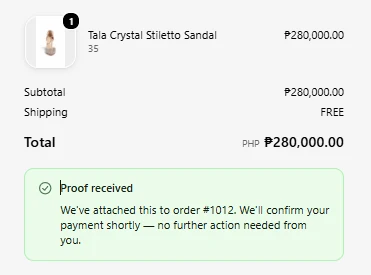
- They upload the receipt from the Thank You page of their Shopify order
- POPLoad attaches it to the right order, so there is nothing to match
- You review the receipt next to the order and approve it
Everything stays connected to the order.
Matching payments to orders
Stop asking “Which order is this payment for?”
When payment proof arrives in Messenger or email, your staff has to match it to an order by hand. With POPLoad, the customer uploads the receipt from their own Shopify order, so the order number is already attached. Just open the submission and review it.
No more:
- Searching Messenger conversations
- Searching email threads
- Asking customers for their order number
- Downloading screenshots
- Renaming receipt files
- Manually attaching proof to an order
How it works
One dashboard for your GCash and bank-transfer orders.
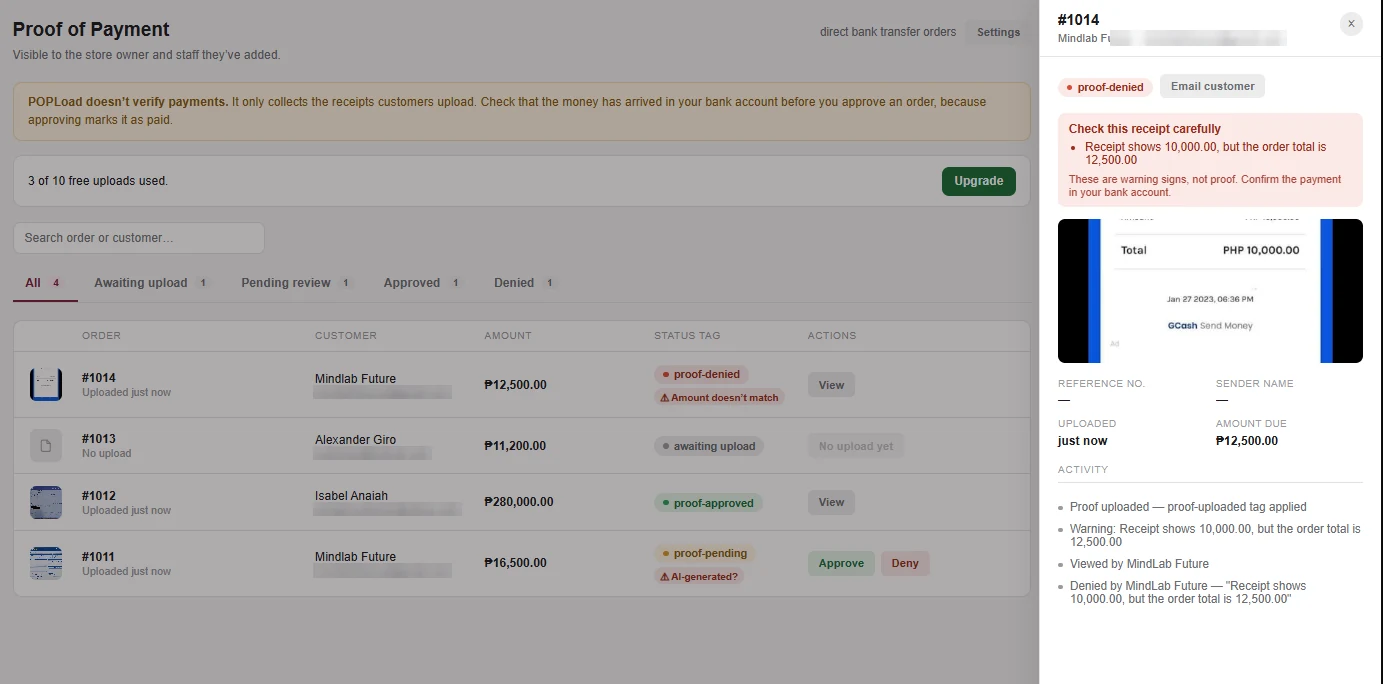
See the receipt together with the order, amount, customer and reference number. Filter by payment-proof status, check your bank, then approve or deny. These are the same statuses you'll see in the POPLoad dashboard.
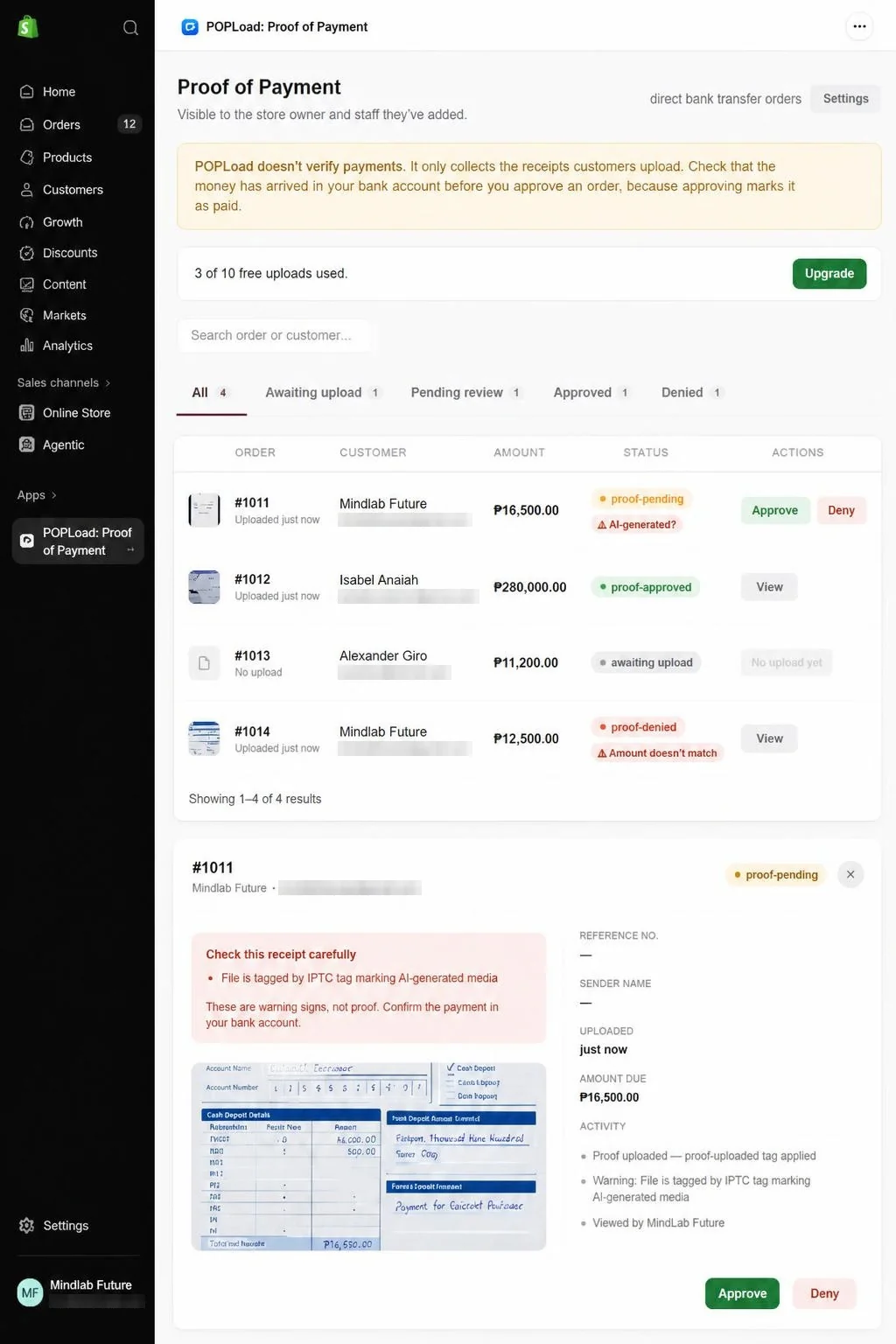
-
Awaiting
Customer checks out and pays you directly
They see the amount due with your bank or e-wallet QR code and account details, so they can pay without typing anything. Then the upload appears, only for the manual payment methods you picked.
-
Pending
They upload the receipt
A photo or screenshot from their banking app, with an optional reference number and sender name. The order number is already filled in.
-
Review
You check it against your bank
See the receipt next to the order total, customer and reference number in one dashboard.
-
Approved
One click marks the order paid
POPLoad marks the order paid in Shopify and updates its tags and notes. If something's off, deny it with a reason instead.
See it in action
What your customers see, and what your team sees.
Screens from a real test store. Personal details and account numbers are blurred, and the QR codes are samples.
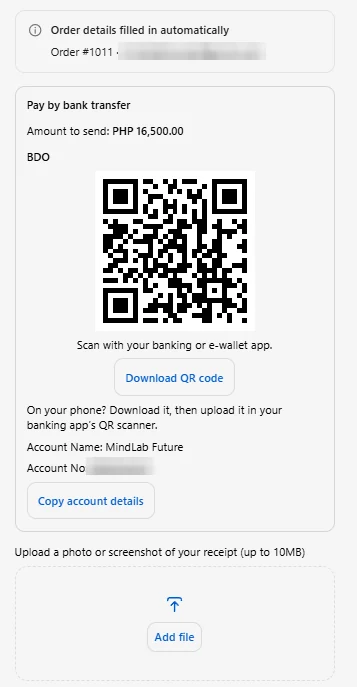
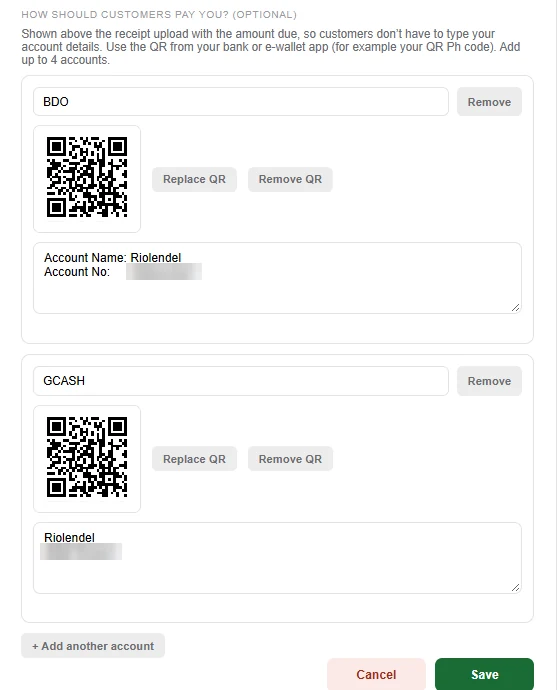
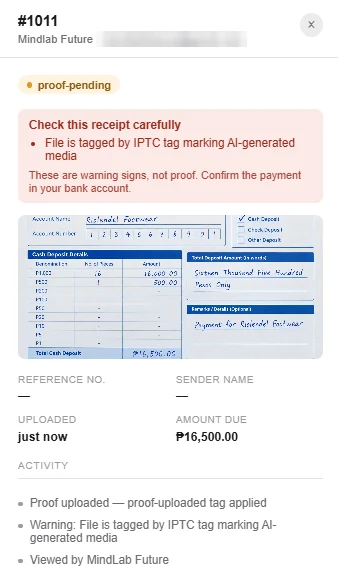
Receipt checks
Catch suspicious receipts before you approve.
Every new upload is checked for the usual signs of a fake or reused receipt, including the amount and reference number read from the receipt itself. Anything that trips a check shows a warning badge in your dashboard. Nothing is denied automatically; you make the call.
- Duplicate file
The same file was already uploaded on another order. Renaming the file doesn't hide it.
- Reused reference no.
The bank reference number, typed in or read from the receipt, matches another order, even with spaces or dashes changed.
- AI-generated?
The file carries a tag from an AI image tool such as OpenAI, Google, Adobe Firefly, Midjourney or Stable Diffusion.
- Edited image
The image was saved by an editor such as Photoshop, Canva, GIMP or PicsArt.
- Not a receipt?
POPLoad reads the text on the image and finds no sign of a bank transfer receipt.
- Amount doesn't match
The amount read from the receipt differs from the order total.
- Dated before order
The receipt is more than a day older than the order it was uploaded to.
The checks flag receipts that need a closer look. They don't confirm a payment, and a cropped or re-screenshotted receipt can pass them. Always check that the money arrived in your bank account before approving.
Security
Your store's data stays locked down.
POPLoad never touches the money or card details. Customers pay straight into your own account; POPLoad only collects the receipt and shows it to the people you choose.
- Signed in through Shopify
- Every dashboard request is checked against a signed Shopify session token, every connection uses HTTPS, and updates from Shopify are checked against Shopify's signature.
- The owner controls access
- Only the store owner can add the staff emails allowed into the dashboard. Remove someone and their access ends on their next request.
- Owner-only payment details
- Only the store owner can add or change bank account details and QR codes. Our server enforces this, so staff can't change where customers send money.
- Every view is logged
- Each receipt shows who opened, approved or denied it, and when.
- Images only
- Uploads must be real JPG, PNG, WebP or HEIC images, checked by their contents. PDFs and disguised files are refused before anything is saved.
- Receipts stay in your Shopify
- Receipt files are saved to your own Shopify Files. Receipt text is read on our own server and never sent to a third party.
- Approved means final
- Once you approve a receipt, that order no longer accepts new uploads, so a paid order can't be reopened with another receipt.
- Deleted when you leave
- 48 hours after you uninstall, your store's data is deleted from our database. Only an anonymous upload count is kept.
Full details are in our privacy policy. To report a security concern, email support@mindlabfuture-ai.com.
Features
Everything is included on every plan.
- Show your bank or e-wallet QR codes, up to 4 accounts, with a download button for phone buyers
- Receipt upload on the Thank You and Order status pages, linked to the order
- Shows only for the manual payment methods you choose
- Accepts JPG, PNG, WebP and HEIC images up to 10 MB
- One dashboard to review, search and filter receipts by status
- Warning badges on duplicate, edited, AI-generated, reused or mismatched receipts
- Approve to mark the order paid, or deny with a reason
- Automatic order tags and notes, so your existing workflows keep working
- See which orders are still waiting for a receipt
- Receipts stored in your own Shopify Files
Pricing
Start with your first 10 receipts.
Free
- 10 uploads in total
- All features
Starter
- Up to 50 uploads a month
- All features
- Or $99 a year
Pro
- Unlimited uploads
- All features
- Or $129 a year, about 2 months free
The 10 free uploads are a one-time allowance and don't reset. After that, choose Starter or Pro to keep accepting receipts; receipts you already have stay available. Starter covers 50 uploads a month, on monthly or annual billing. Billed through Shopify in USD on your Shopify invoice.
A bonus: skip the gateway fee on direct transfers
| Monthly direct transfer sales | ~3% card fees | POPLoad Pro | You keep |
|---|---|---|---|
| $1,000 | ~$30 | $14.99 | ~$15 |
| $5,000 | ~$150 | $14.99 | ~$135 |
| $20,000 | ~$600 | $14.99 | ~$585 |
Indicative only. Card rates vary by country, plan and card type, and gateways also charge for the bank transfers and QR payments they process, often 1% or more with a minimum per payment. POPLoad doesn't replace your card gateway; it makes bank transfer a practical extra option for customers who prefer it. Smaller stores can start on Starter at $9.99 a month.
Questions
Before you install
Does POPLoad confirm that the customer actually paid?
No. POPLoad collects and organizes the payment proof. You still check your bank or GCash account before approving a payment.
Can customers pay using GCash?
Yes. If you have a GCash QR code, add it in POPLoad's Settings and customers can scan it to pay you directly. They pay your own account, then upload the receipt.
Do customers still need to message us their receipt?
No. Instead of sending the screenshot through Messenger, email, Instagram or Viber, customers upload it from the Thank You page of their Shopify order.
Does POPLoad automatically mark orders as paid?
No. You review the submitted receipt first. When you approve it, POPLoad marks the Shopify order as paid and updates its tags and notes.
Will the receipt be connected to the correct order?
Yes. The upload is made from the customer's own order, so the order number is already attached to the submission.
Which payment methods show the upload?
Only the manual payment methods you pick in settings, such as Bank Deposit. Card and wallet orders never see it.
What happens after the 10 free uploads?
New uploads pause until you choose a plan: Starter at $9.99/month ($99/year) for up to 50 uploads a month, or Pro at $14.99/month ($129/year) for unlimited uploads. Receipts you already have stay available.
GCash payment proof shouldn't live in Messenger. Put it on the Shopify order.
Try POPLoad on real orders before you pay. Questions first? We reply within 1 business day, Monday to Friday.